
Welcome to World of IPTV

Join us now to get access to all our features. Once registered and logged in, you will be able to create topics, post replies to existing threads, give reputation to your fellow members, get your own private messenger, and so, so much more. It's also quick and totally free, so what are you waiting for?

Forum Rules

Our Rules: Read to avoid getting banned!

Advertising

Introduce Yourself to the World with Us!

Resource Database

Find the newest resources around IPTV!

Account upgrade

Upgrade your account to unlock more benefits!

Question XUI One LB install

Status
Not open for further replies.

netkoinesto15

Basic Member
Basic Member
Joined
Nov 17, 2022
Messages
32
Reaction score
12
Points
19
Location
Germany
Hello, I am trying to install a LB server. I have installed main server on a vps and it works fine. I now wnat to install LB on another Vps server. Through main i install the server but it never goes online. When i access using ssh LB server and see the status it says "
Status
------------------------------
XUI is not running.

Database
------------------------------
{"error":"MySQL: Cannot connect to database! Please check credentials."}"

I have entered the correct data username and password credentials in config.ini and as i can see the xui has created a new file credentials that hashed the data. So the credentials file should be correct.

I think the problem is in main, i can see the user in mysql (for LB and the ip) in user table. But when i try to connect with terminal to the database server it is refused.

I tried to grant all access to LB user but it still doesnt work.

Can somebody help me where is the problem?

Thank you in advance!

 
Hello, I am trying to install a LB server. I have installed main server on a vps and it works fine. I now wnat to install LB on another Vps server. Through main i install the server but it never goes online. When i access using ssh LB server and see the status it says "
Status
------------------------------
XUI is not running.

Database
------------------------------
{"error":"MySQL: Cannot connect to database! Please check credentials."}"

I have entered the correct data username and password credentials in config.ini and as i can see the xui has created a new file credentials that hashed the data. So the credentials file should be correct.

I think the problem is in main, i can see the user in mysql (for LB and the ip) in user table. But when i try to connect with terminal to the database server it is refused.

I tried to grant all access to LB user but it still doesnt work.

Can somebody help me where is the problem?

Thank you in advance!
It's solved. Have to install with ROOT username! Thanks to one guy from forum who helped!
 
Good morning
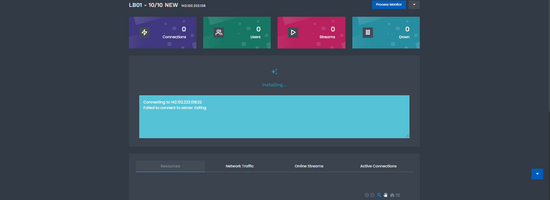
I have a problem when installing lb, it gives me this error, I've already tried every possible procedure and I can't format this machine because there are several vods inside that I could give you some help, I hope I already get this error in the image.erro lb.png
 
Channels MatchTime Unblock CDN Offshore Server Contact
100 cnx / 90€ 5Gbps / 180€ 48CPU-256GRAM 10Gbps 569€ Skype live:giefsl
500 cnx / 350€ 10Gbps / 350€ 48CPU-128GRAM 5Gbps / 349€ TG @changcdn
1000 cnx / 500€ 20Gbps / 700€ 40CPU-128GRAM 20Gbps / €980 http://coronaserver.com
Good morning
I have a problem when installing lb, it gives me this error, I've already tried every possible procedure and I can't format this machine because there are several vods inside that I could give you some help, I hope I already get this error in the image.View attachment 4850
Please use the search and an existing thread in the future.

The answers are already here and I have already mentioned them here a few times.

you have to install with root user.

In your case it may also be that you have specified incorrect data and therefore not Connectet.

make it new. You either didn't use root user or you have incorrect data
 
Does anyone know which script initiates the remote connection and executes the LB installation and configuration commands in XUI one?
In XtreamUI there were Python scripts that did this but in XUI.one what exactly initiates this?
 
Hello, I am trying to install a LB server. I have installed main server on a vps and it works fine. I now wnat to install LB on another Vps server. Through main i install the server but it never goes online. When i access using ssh LB server and see the status it says "
Status
------------------------------
XUI is not running.

Database
------------------------------
{"error":"MySQL: Cannot connect to database! Please check credentials."}"

I have entered the correct data username and password credentials in config.ini and as i can see the xui has created a new file credentials that hashed the data. So the credentials file should be correct.

I think the problem is in main, i can see the user in mysql (for LB and the ip) in user table. But when i try to connect with terminal to the database server it is refused.

I tried to grant all access to LB user but it still doesnt work.

Can somebody help me where is the problem?

Thank you in advance!

similar problem faced by me. here the output for LB
root@vi:~# /home/xui/status

Status
------------------------------
XUI is running.

Database
------------------------------
{"error":"MySQL: Cannot connect to database! Please check credentials."}root@vijesh-Precision-T3600:~#

And the Main:
root@vijesh-Precision-T7610:/# /home/xui/status

Status
------------------------------
XUI is running.

Database
------------------------------
Connected successfully.

License
------------------------------
License expires: 2038-01-19 08:44:07

Access Codes
------------------------------


Servers
------------------------------
Server #24 - 192.168.40.2 - Down since: Always

Installed Version: 1.5.13
------------------------------
All servers are up to date!


where 192.168.40.2 is the LB IP
I tried to reset mysql database password... no use..
what is the issue ?
 
Channels MatchTime Unblock CDN Offshore Server Contact
100 cnx / 90€ 5Gbps / 180€ 48CPU-256GRAM 10Gbps 569€ Skype live:giefsl
500 cnx / 350€ 10Gbps / 350€ 48CPU-128GRAM 5Gbps / 349€ TG @changcdn
1000 cnx / 500€ 20Gbps / 700€ 40CPU-128GRAM 20Gbps / €980 http://coronaserver.com
I finally got the issue sorted out . it was the ssh login password on the Main server !!! This simple thing escaped my observation as I was working on the main server terminal LOCALLY and the root password was working perfect. I tried login in from a Client PC and the issue shows up .. password not correct error !!! So just reset the pass on the main using passwd command. In short to sum up
1) Install ssh service
2) check the sushi_config file for the permission for remote root access
/etc/ssh nano edit sshd_config
Edit permit root access to YES
3)reset password for root on main using passed.

And that is it ..
 
I have the sam problem as vijesh:

Status
------------------------------
XUI is running.

Database
------------------------------
{"error":"MySQL: Cannot connect to database! Please check credentials."}root@vijesh-Precision-T3600:~#


But my root user is working. In local instalation LB work after install but if LB instalation is on remote server I got this error.

Do main XUI server need to be directly on public IP or can be behind firewall, with all port forward (as in my situation), so could this be a problem?
 
I have the sam problem as vijesh:

Status
------------------------------
XUI is running.

Database
------------------------------
{"error":"MySQL: Cannot connect to database! Please check credentials."}root@vijesh-Precision-T3600:~#


But my root user is working. In local instalation LB work after install but if LB instalation is on remote server I got this error.

Do main XUI server need to be directly on public IP or can be behind firewall, with all port forward (as in my situation), so could this be a problem?
Xui one will work behind port forward, however you need to forward your ssh (22 or whatever you use) port as well as any streaming ports. You must also set the port when you create the lb server on the main (in the panel gui, as well as root user and password on the server edit page. Hope it helps
 
Channels MatchTime Unblock CDN Offshore Server Contact
100 cnx / 90€ 5Gbps / 180€ 48CPU-256GRAM 10Gbps 569€ Skype live:giefsl
500 cnx / 350€ 10Gbps / 350€ 48CPU-128GRAM 5Gbps / 349€ TG @changcdn
1000 cnx / 500€ 20Gbps / 700€ 40CPU-128GRAM 20Gbps / €980 http://coronaserver.com
Xui one will work behind port forward, however you need to forward your ssh (22 or whatever you use) port as well as any streaming ports. You must also set the port when you create the lb server on the main (in the panel gui, as well as root user and password on the server edit page. Hope it helps
Port 22 is forward, also 80, 433 and 3306 for database.

Installation is finished from main but LB never go online when install on remote server and got this error on LB
{"error":"MySQL: Cannot connect to database! Please check credentials."}root@vijesh-Precision-T3600:~#

on local server LB is working after installation

Main is ubuntu 24, also tried to install LB on 24, 22 without success.

As I said root login is ok. Soo don't know what is the problem.

Xui one will work behind port forward, however you need to forward your ssh (22 or whatever you use) port as well as any streaming ports. You must also set the port when you create the lb server on the main (in the panel gui, as well as root user and password on the server edit page. Hope it helps
In the panel gui set port 22, root login too, because without that installation can't finished. Soo this must be correct, if you mean on that.

Main is behind firewall and LB is with direct public ip on the server.
 
Good morning
I have a problem when installing lb, it gives me this error, I've already tried every possible procedure and I can't format this machine because there are several vods inside that I could give you some help, I hope I already get this error in the image.View attachment 4850
Check that your IP is not blocked, ping it and also check if you have the root user.
 
Status
Not open for further replies.
shape1
shape2
shape3
shape4
shape5
shape6
Back
Top










