
Welcome to World of IPTV

Join us now to get access to all our features. Once registered and logged in, you will be able to create topics, post replies to existing threads, give reputation to your fellow members, get your own private messenger, and so, so much more. It's also quick and totally free, so what are you waiting for?

Forum Rules

Our Rules: Read to avoid getting banned!

Advertising

Introduce Yourself to the World with Us!

Resource Database

Find the newest resources around IPTV!

Account upgrade

Upgrade your account to unlock more benefits!

Tutorial Collection for Xtream Codes Panel Commands

redhat

Administrator
Staff member
Administrator
Joined
Jun 19, 2019
Messages
3,473
Reaction score
17,125
Points
134
Location
root[@]woi
Hi there,

i just open this thread to collect all known Xtream Codes commands Tips and Tricks you know, for example how to start and stop the Panel or other Services like Nginx.
You can also post some special known modification or some like that. Just share all yout Knowledge with Xtream Codes.

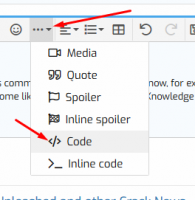
For codes please use the BB Codes:
312

Thanks in advance for all your sharings.

 
Fast Reload

Code:
/home/xtreamcodes/iptv_xtream_codes/start_services.sh

Reload EPG

Code:
sudo -H -u xtreamcodes bash -c '/home/xtreamcodes/iptv_xtream_codes/php/bin/php /home/xtreamcodes/iptv_xtream_codes/crons/epg.php'
 
Backing up xtream codes database
On ssh do:
Code:
mysqldump -u root -p xtream_iptvpro > /tmp/xtream_iptvpro.sql

To upload database
On ssh do:
Code:
mysql -u root -p xtream_iptvpro < /tmp/xtream_iptvpro.sql
wait a minute and all is working
 
Channels MatchTime Unblock CDN Offshore Server Contact
100 cnx / 90€ 5Gbps / 180€ 48CPU-256GRAM 10Gbps 569€ Skype live:giefsl
500 cnx / 350€ 10Gbps / 350€ 48CPU-128GRAM 5Gbps / 349€ TG @changcdn
1000 cnx / 500€ 20Gbps / 700€ 40CPU-128GRAM 20Gbps / €980 http://coronaserver.com
Channels MatchTime Unblock CDN Offshore Server Contact
100 cnx / 90€ 5Gbps / 180€ 48CPU-256GRAM 10Gbps 569€ Skype live:giefsl
500 cnx / 350€ 10Gbps / 350€ 48CPU-128GRAM 5Gbps / 349€ TG @changcdn
1000 cnx / 500€ 20Gbps / 700€ 40CPU-128GRAM 20Gbps / €980 http://coronaserver.com
API Start/Stop Streams/vods / View Online/Offline Streams

Code:
apt install curl -y

  • View Server List
    Perform this request, to view all your servers, main & load balancers including their status

    http://your_dns:port/api.php?action=server&sub=list

    Code:
    ex: curl "http://127.0.0.1:80/api.php?action=server&sub=list"
  • View Online Streams
    Perform this request, to view only the online Live Streams

    http://your_dns:port/api.php?action=stream&sub=online
    Code:
    ex: curl "http://127.0.0.1:80/api.php?action=stream&sub=online"
  • View Offline Streams
    Perform this request, to view only the Offline Live Streams

    http://your_dns:port/api.php?action=server&sub=offline
    Code:
    ex: curl "http://127.0.0.1:80/api.php?action=server&sub=offline"
  • Start/Restart A Stream
    Perform this request, to start or restart a Live Stream. The last argument is an array in which you can specify the stream ids. It works with POST method as well.

    http://your_dns:port/api.php?action=stream&sub=start&stream_ids[]=1
  • Code:
    ex: curl "http://127.0.0.1:80/api.php?action=stream&sub=start&stream_ids[]=51"
  • Stop A Stream
    Perform this request, to stop a Live Stream. The last argument is an array in which you can specify the stream ids. It works with POST method as well.

    http://your_dns:port/api.php?action=stream&sub=stop&stream_ids[]=1
    Code:
    ex: curl "http://127.0.0.1:80/pi.php?action=stream&sub=stop&stream_ids[]=557"
  • Start VOD Encoding (Applies for series episodes as well )
  • Perform this request, to start a VOD Encoding process. The last argument is an array in which you can specify the stream ids. It works with POST method as well.

    http://your_dns:port/api.php?action=vod&sub=start&stream_ids[]=1
    Code:
    ex: curl "http://127.0.0.1:80/api.php?action=vod&sub=start&stream_ids[]=554"
  • Stop A VOD Encoding
    Perform this request, to stop a VOD Encoding. The last argument is an array in which you can specify the stream ids. It works with POST method as well.

    http://your_dns:port/api.php?action=vod=stop&stream_ids[]=1
Code:
ex: curl "http://127.0.0.1:80/api.php?action=vod=stop&stream_ids[]=555
 
Channels MatchTime Unblock CDN Offshore Server Contact
100 cnx / 90€ 5Gbps / 180€ 48CPU-256GRAM 10Gbps 569€ Skype live:giefsl
500 cnx / 350€ 10Gbps / 350€ 48CPU-128GRAM 5Gbps / 349€ TG @changcdn
1000 cnx / 500€ 20Gbps / 700€ 40CPU-128GRAM 20Gbps / €980 http://coronaserver.com
Authentication
player_api.php?username=X&password=X
GET Live Stream Categories
player_api.php?username=X&password=X&action=get_live_categories
GET VOD Stream Categories
player_api.php?username=X&password=X&action=get_vod_categories
GET SERIES Categories
player_api.php?username=X&password=X&action=get_series_categories
GET LIVE Streams
player_api.php?username=X&password=X&action=get_live_streams (This will get All LIVE Streams)
player_api.php?username=X&password=X&action=get_live_streams&category_id=X (This will get All LIVE Streams in the selected category ONLY)
GET VOD Streams
player_api.php?username=X&password=X&action=get_vod_streams (This will get All VOD Streams)
player_api.php?username=X&password=X&action=get_vod_streams&category_id=X (This will get All VOD Streams in the selected category ONLY)
GET SERIES Streams
player_api.php?username=X&password=X&action=get_series (This will get All Series)
player_api.php?username=X&password=X&action=get_series&category_id=X (This will get All Series in the selected category ONLY)
GET SERIES Info
player_api.php?username=X&password=X&action=get_series_info&series_id=X
GET VOD Info
player_api.php?username=X&password=X&action=get_vod_info&vod_id=X (This will get info such as video codecs, duration, description, directors for 1 VOD)

GET short_epg for LIVE Streams (same as stalker portal, prints the next X EPG that will play soon)
player_api.php?username=X&password=X&action=get_short_epg&stream_id=X
player_api.php?username=X&password=X&action=get_short_epg&stream_id=X&limit=X (You can specify a limit too, without limit the default is 4 epg listings)
GET ALL EPG for LIVE Streams (same as stalker portal, but it will print all epg listings regardless of the day)
player_api.php?username=X&password=X&action=get_simple_data_table&stream_id=X
Full EPG List for all Streams
xmltv.php?username=X&password=X
 
better to tell which version of xtream


V1 or V2
 
If someone need to add compatiblity for more Mag devices

1. you log in to your panel.
2. go to database manager
3. Run SQL query (for advanced users only)
4. you put
update settings set allowed_stb_types = '"MAG200","MAG351","MAG352","MAG245","MAG245D","MAG250","MAG254","MAG255","MAG256","MAG257","MAG260","MAG270","MAG275","WR320","MAG322","MAG323"';


image.php


5. Run queries.

Have test it on V.1.59

P.S. if you have another type of mag you can add it to the line.(e.x. MAG420 )

copyright happy-team.org author @einstein
 
Channels MatchTime Unblock CDN Offshore Server Contact
100 cnx / 90€ 5Gbps / 180€ 48CPU-256GRAM 10Gbps 569€ Skype live:giefsl
500 cnx / 350€ 10Gbps / 350€ 48CPU-128GRAM 5Gbps / 349€ TG @changcdn
1000 cnx / 500€ 20Gbps / 700€ 40CPU-128GRAM 20Gbps / €980 http://coronaserver.com
Server deleted from the database! However, IPTV Panel was unable to connect to the remote SSH to completely delete the files.
Please do it manually by executing the following commands:


Code:
rm -rf /home/xtreamcodes

crontab -u xtreamcodes -e

and delete everything that contain ffmpeg, php-fpm, nginx

same for: /etc/init.d/rc.local

then execute the command:

apt-get update && apt-get autoremove && apt-get autopurge


or


umount -l /home/xtreamcodes/iptv_xtream_codes/tmp

umount -l /home/xtreamcodes/iptv_xtream_codes/streams

rm -rf /home/xtreamcodes/iptv_xtream_codes/
 
Last edited:
Channels MatchTime Unblock CDN Offshore Server Contact
100 cnx / 90€ 5Gbps / 180€ 48CPU-256GRAM 10Gbps 569€ Skype live:giefsl
500 cnx / 350€ 10Gbps / 350€ 48CPU-128GRAM 5Gbps / 349€ TG @changcdn
1000 cnx / 500€ 20Gbps / 700€ 40CPU-128GRAM 20Gbps / €980 http://coronaserver.com
API Start/Stop Streams/vods / View Online/Offline Streams

Code:
apt install curl -y

  • View Server List
    Perform this request, to view all your servers, main & load balancers including their status

    http://your_dns:port/api.php?action=server&sub=list

    Code:
    ex: curl "http://127.0.0.1:80/api.php?action=server&sub=list"
  • View Online Streams
    Perform this request, to view only the online Live Streams

    http://your_dns:port/api.php?action=stream&sub=online
    Code:
    ex: curl "http://127.0.0.1:80/api.php?action=stream&sub=online"
  • View Offline Streams
    Perform this request, to view only the Offline Live Streams

    http://your_dns:port/api.php?action=server&sub=offline
    Code:
    ex: curl "http://127.0.0.1:80/api.php?action=server&sub=offline"
  • Start/Restart A Stream
    Perform this request, to start or restart a Live Stream. The last argument is an array in which you can specify the stream ids. It works with POST method as well.

    http://your_dns:port/api.php?action=stream&sub=start&stream_ids[]=1
  • Code:
    ex: curl "http://127.0.0.1:80/api.php?action=stream&sub=start&stream_ids[]=51"
  • Stop A Stream
    Perform this request, to stop a Live Stream. The last argument is an array in which you can specify the stream ids. It works with POST method as well.

    http://your_dns:port/api.php?action=stream&sub=stop&stream_ids[]=1
    Code:
    ex: curl "http://127.0.0.1:80/pi.php?action=stream&sub=stop&stream_ids[]=557"
  • Start VOD Encoding (Applies for series episodes as well )
  • Perform this request, to start a VOD Encoding process. The last argument is an array in which you can specify the stream ids. It works with POST method as well.

    http://your_dns:port/api.php?action=vod&sub=start&stream_ids[]=1
    Code:
    ex: curl "http://127.0.0.1:80/api.php?action=vod&sub=start&stream_ids[]=554"
  • Stop A VOD Encoding
    Perform this request, to stop a VOD Encoding. The last argument is an array in which you can specify the stream ids. It works with POST method as well.

    http://your_dns:port/api.php?action=vod=stop&stream_ids[]=1
Code:
ex: curl "http://127.0.0.1:80/api.php?action=vod=stop&stream_ids[]=555
I saw this before but didnt work, the secret is apt install curl -y?
 
Code:
this restart xc

run : /etc/init.d/xtreamcodes

---

this reload tcp setting

run : sysctl -p
 
Last edited:
Server deleted from the database! However, IPTV Panel was unable to connect to the remote SSH to completely delete the files. Please do it manually by executing the following commands:
rm -rf /home/xtreamcodes
crontab -u xtreamcodes -e
and delete everything that contain ffmpeg, php-fpm, nginx
same for: /etc/init.d/rc.local
then execute the command:
apt-get update && apt-get autoremove && apt-get autopurge

or

umount -l /home/xtreamcodes/iptv_xtream_codes/tmp
umount -l /home/xtreamcodes/iptv_xtream_codes/streams
rm -rf /home/xtreamcodes/iptv_xtream_codes/
This is to remark server?
 
Channels MatchTime Unblock CDN Offshore Server Contact
100 cnx / 90€ 5Gbps / 180€ 48CPU-256GRAM 10Gbps 569€ Skype live:giefsl
500 cnx / 350€ 10Gbps / 350€ 48CPU-128GRAM 5Gbps / 349€ TG @changcdn
1000 cnx / 500€ 20Gbps / 700€ 40CPU-128GRAM 20Gbps / €980 http://coronaserver.com
shape1
shape2
shape3
shape4
shape5
shape6
Back
Top









