
Welcome to World of IPTV

Join us now to get access to all our features. Once registered and logged in, you will be able to create topics, post replies to existing threads, give reputation to your fellow members, get your own private messenger, and so, so much more. It's also quick and totally free, so what are you waiting for?

Forum Rules

Our Rules: Read to avoid getting banned!

Advertising

Introduce Yourself to the World with Us!

Resource Database

Find the newest resources around IPTV!

Account upgrade

Upgrade your account to unlock more benefits!

Tutorial HowTo install Resellers Billing module for WHMCS.

urgodfather

Extended Member
Ext. Member
Joined
Sep 22, 2019
Messages
2,086
Reaction score
6,243
Points
124
Location
neither here, nor there
Installation Instructions
Installation Instructions - Smart Reseller Billing Panel Module for Xtream Codes.


**IMPORTANT NOTE- Re-Captcha should be dis-abled**

Download the zip file from your Client Area
From here:.

Upload it on your Server and Extract it
We assume that you have installed WHMCS Instance.

1. Upload the zip file to your WHMCS Root directory (where modules, templates are placed)

2. Extract the zip files

3. Make sure your modules are uploaded on their intended places

WSResellerPanel: it should be uploaded /<whmcs-dir>/modules/servers/WSResellerPanel.

WSResellerPanelDashboard: It should be uploaded here /<whmcs-dir>/modules/addons/WSResellerPanelDashboard.

Enter the license key

1. In order to get your module working, you must enter the license key.

1) Add your license key - Login to Admin area > Setup tab > Addon Modules >XtreamCodes Reseller

CiLrRNIqN6MhfcYGctbotM_grjxIRM-RPKRIDp3zYmbtJmtVwrn9wqd5FJxxxjnWEzgm3Gg0lxso8yC1UZSZUkpCuh2_ilAd8RxKiojChNhxA7Qlf6y5rKN4jwwL1fmNanEWjN2E


Place R-xxxxxxx with your license key
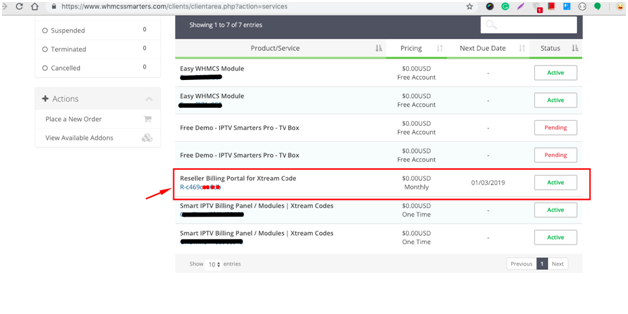
FPyWDG-nPEzzmjChraE37o8Vtc5mBxvZKmY3PFyKgJ7JiN1SMBSJQW-Jov0Nm6eODDhya6oIV1z1WIjvnn-2WdgkpxEtQWzQ-Eh9B7lsCyWr6HEPqKLfo5-OZoN0q9euN7hqZRJT


2. Open this file and enter your license key in this file.

Activate the module
1. Login to Admin Area -> Setup -> Addons Modules

2. Find out our module "WSResellerPanelDashboard" and activate it.

3. You have to click on "configure" button to give the Access Control to your administrator

oCrbIfTHXyyrTIHGSJf5eVIe4eep7sQvYX4CawLrJEdAkM06TPp5_BXfZnMdxQHLZ0KDKUMOYH48_LAc_k3rsPNbsREWOcVRC4R0j8m_ZVIVy2FOg9xrh--lUciAKKwmO7Gw9hvQ


Make a Connection between Xtream Codes Panel and Smart Reseller IPTV Billing Panel
How to add Xtream Codes Server?

Or

How to make the connection between Smart Reseller IPTV Billing Panel and Reseller Xtream Codes Panel?

Or

How to connect Smart Reseller IPTV Billing Panel to Reseller Xtream Codes?

Or

How to link your Reseller Xtream Codes with our Smart Reseller IPTV Billing Panel

Note:Before making connection or adding server, WSResellerPanelDashboard modules must be installed with valid license key

Requirements: Should have following things before making connection

  • Xtream Codes Reseller Panel Credentials:
✔Xtream Codes Panel URL

✔Reseller Username

✔Reseller Password


Step by Step instructions to make it quickly:
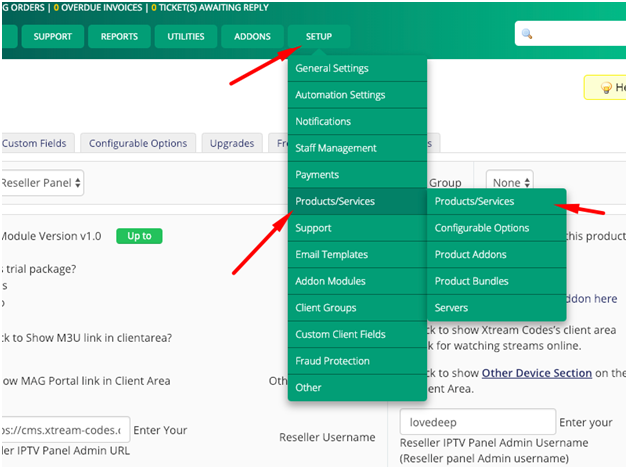
  • Login to Admin Dashboard - (http://yoursite.com/<billing-panel>/admin)
  • Navigate to Setup -> Products/Services -> Products/Services
RiNtoR7UznXiAFmqgeu4Ya3j4NLMF-7zuURKxcTdu5ZwSIHGcryjoF0XczLCwJfm6Wb5tGOOVel-QpxvHdRzdPzbwiscaIEH7VBRkXR6SnA-x3d4SHH-fSX4Ira94rACynywFcdM


· Click on Create A New Group (skip if you have already created a group)

Z4Zh_o2bhzlU28phz3m7oN3qUrExHGF5ZKpmwXwsVpmSoTj1J8d-TAcNYcSi_m2r40I35qeR6ir_mVLcTY1jgLdKFRLE_RNHqo0VYVksvU8d_BKvGC5CuEcxi__g7jJeMoA5gCht


✔ Product Group Name= Anything (suggested: Free Trials )

✔ Product Group Headline - anything (eg. Select Your Perfect Product )

✔ Save changes (leave other things as default )

· Click on Add A New Product and enter the required fields

✔Product Type :Other

✔Product Group : <select your group you have created already> (e.g :Free Trials )

✔Product Name = Anything ( e.g - 1 Day Free Trial or 24 Hrs Trial m3u play list All Packages)

✔Product Description = anything that will show on order form for your customers

✔Welcome Email = IPTV Services Details ( IMPORTANT )

✔ Uncheck this option - Require Domain - (Important )

xMNz9XZ-h9P7N9P_K1YTZenhQtXaRpYppwMUvcT3Jtf5VE_g7A7JK7MITmWBB08C-tbvf1cyrjCGJmI2GnnK4OYP7dXsqzb65fM8jRmBuodSZhMnTAl9iCeZcmEGifF2R_8tZ3O5


✔ Click on the next Tab - Pricing

✔Payment Type : Free (For only Free Trial Products)

✔ Auto Terminate/Fixed Term = enter the number of days you want to give free trial ( e.g = 1 )

✔ Go to next Tab – Module Settings and configure it as :-

kwmKgR0Bwu-p7Lgd4caHewOH33-dC2LujlvKbEFWMZiGXohdDg5IHXtFxA8DchTnmLQh2WDD7bfj30rKV8fASwKy904bs8nzDIo7uOx2lGYw9AE_9p-OWaVMzfBaaSs9zEl1m-mi


· Module Name - Selec t “ WS Reseller Panel ”

  • Product - Streamline - It refers – What type of product is this? what should be created once this product is ordered ?(Streamline, MAG Device)
  • Trial Package : Is this trial package? (For `Yes` see the text box for entering trial period)
  • M3U link: Tick to Show M3U link in the client area?
  • Select package: Here we can assign package to this product. Click on “Assign package to this product” then it will load the available packages then you can select accordingly. (No need to enter package ID manually).
  • Watch Streams : Tick to Show “Watch Streams” link in client area? When a user logs in their client area, they can see “Watch Stream” link that redirects to X.C Panel Client area and logs user in. (Web TV Feature)
  • MAG Portal link = optional if you want to show MAG Portal on the Client Area
  • Recommended -Click Here to Create Required Custom Fields : It will create required custom fields. (like Username )
  • Automatically setup the product as soon as an order is placed = For Free Trial ,you can set this option if you want to activate free trial automated as soon as customer places the order
  • Enter the required details
✔Enter – Xtream Codes Panel URL

✔Reseller Username - Username

✔Reseller Password – Password

✔Mag Portal – http://<yourdns>:<port>

✔ Save changes

mTS7eW0J65vMyw1evdH5JWlphzOQrDJc_TeeaJ-KgI1y-bGHbcat2PfvUZGxpJaXKMPnswRzuk6zLCieV04aX6JvVt0xcDUykFhc1juRWecE9Zv9XJkrPkFHZnAEgyS_6dMjxjuY


It’s all done.
  • Reminder of the rules. Don't post to say "thanks" use the ->>>> (y)
  • If you make post to say thanks, ->BAN
  • If you ask for likes -> BAN
  • If you post anything that is not English -> BAN. (THIS INCLUDES CODE, ERRORS, & COMMANDS) It's 2 clicks!
Let's keep this thread clean!

images
 
Last edited:
Installation Instructions
Installation Instructions - Smart Reseller Billing Panel Module for Xtream Codes.


**IMPORTANT NOTE- Re-Captcha should be dis-abled**

Download the zip file from your Client Area
From here:.

Upload it on your Server and Extract it
We assume that you have installed WHMCS Instance.

1. Upload the zip file to your WHMCS Root directory (where modules, templates are placed)

2. Extract the zip files

3. Make sure your modules are uploaded on their intended places

WSResellerPanel: it should be uploaded /<whmcs-dir>/modules/servers/WSResellerPanel.

WSResellerPanelDashboard: It should be uploaded here /<whmcs-dir>/modules/addons/WSResellerPanelDashboard.

Enter the license key

1. In order to get your module working, you must enter the license key.

1) Add your license key - Login to Admin area > Setup tab > Addon Modules >XtreamCodes Reseller

CiLrRNIqN6MhfcYGctbotM_grjxIRM-RPKRIDp3zYmbtJmtVwrn9wqd5FJxxxjnWEzgm3Gg0lxso8yC1UZSZUkpCuh2_ilAd8RxKiojChNhxA7Qlf6y5rKN4jwwL1fmNanEWjN2E


Place R-xxxxxxx with your license key

FPyWDG-nPEzzmjChraE37o8Vtc5mBxvZKmY3PFyKgJ7JiN1SMBSJQW-Jov0Nm6eODDhya6oIV1z1WIjvnn-2WdgkpxEtQWzQ-Eh9B7lsCyWr6HEPqKLfo5-OZoN0q9euN7hqZRJT


2. Open this file and enter your license key in this file.

Activate the module
1. Login to Admin Area -> Setup -> Addons Modules

2. Find out our module "WSResellerPanelDashboard" and activate it.

3. You have to click on "configure" button to give the Access Control to your administrator

oCrbIfTHXyyrTIHGSJf5eVIe4eep7sQvYX4CawLrJEdAkM06TPp5_BXfZnMdxQHLZ0KDKUMOYH48_LAc_k3rsPNbsREWOcVRC4R0j8m_ZVIVy2FOg9xrh--lUciAKKwmO7Gw9hvQ


Make a Connection between Xtream Codes Panel and Smart Reseller IPTV Billing Panel
How to add Xtream Codes Server?

Or

How to make the connection between Smart Reseller IPTV Billing Panel and Reseller Xtream Codes Panel?

Or

How to connect Smart Reseller IPTV Billing Panel to Reseller Xtream Codes?

Or

How to link your Reseller Xtream Codes with our Smart Reseller IPTV Billing Panel

Note:Before making connection or adding server, WSResellerPanelDashboard modules must be installed with valid license key

Requirements: Should have following things before making connection

  • Xtream Codes Reseller Panel Credentials:
✔Xtream Codes Panel URL

✔Reseller Username

✔Reseller Password

Where do we add the URL, username, and password?
 
Channels MatchTime Unblock CDN Offshore Server Contact
100 cnx / 90€ 5Gbps / 180€ 48CPU-256GRAM 10Gbps 569€ Skype live:giefsl
500 cnx / 350€ 10Gbps / 350€ 48CPU-128GRAM 5Gbps / 349€ TG @changcdn
1000 cnx / 500€ 20Gbps / 700€ 40CPU-128GRAM 20Gbps / €980 http://coronaserver.com
Channels MatchTime Unblock CDN Offshore Server Contact
100 cnx / 90€ 5Gbps / 180€ 48CPU-256GRAM 10Gbps 569€ Skype live:giefsl
500 cnx / 350€ 10Gbps / 350€ 48CPU-128GRAM 5Gbps / 349€ TG @changcdn
1000 cnx / 500€ 20Gbps / 700€ 40CPU-128GRAM 20Gbps / €980 http://coronaserver.com
Channels MatchTime Unblock CDN Offshore Server Contact
100 cnx / 90€ 5Gbps / 180€ 48CPU-256GRAM 10Gbps 569€ Skype live:giefsl
500 cnx / 350€ 10Gbps / 350€ 48CPU-128GRAM 5Gbps / 349€ TG @changcdn
1000 cnx / 500€ 20Gbps / 700€ 40CPU-128GRAM 20Gbps / €980 http://coronaserver.com
Channels MatchTime Unblock CDN Offshore Server Contact
100 cnx / 90€ 5Gbps / 180€ 48CPU-256GRAM 10Gbps 569€ Skype live:giefsl
500 cnx / 350€ 10Gbps / 350€ 48CPU-128GRAM 5Gbps / 349€ TG @changcdn
1000 cnx / 500€ 20Gbps / 700€ 40CPU-128GRAM 20Gbps / €980 http://coronaserver.com
Hello guys. I write because I'm already going really crazy. I have my own xtream ui panel, I am the admin, and I want everything to be done automatically, I have resellers and I want billing to deposit the credits in the resellers ... I have been doing many tests, with 4 modules, 2 of whmcs smarters, 1 from xtream resell and another from mikkm ... the one from xtream resell and the one from mikkm work well, only if you configure it to give official lines of the packages you have configured in xtream, but it doesn't work well, to create resellers .... I have done millions of tests ... and they all go wrong ... whmcs modules do not even connect me on the server because it rejects mysql, everything is configured perfectly ... I go crazy in something else , and it is what I do not understand. Can you clarify one thing for me? I use whmcs, but I see that there is another panel on the smart iptv billing panel, what difference does it make? and how can i get it? I am very lost in this and I need help, because I am very interested in having it, because I need it. All your help will be very grateful guys.
I send photos of the panel that I have, and the panel that I say
Thanks you very much for reading this! regards

 
Installation Instructions
Installation Instructions - Smart Reseller Billing Panel Module for Xtream Codes.


**IMPORTANT NOTE- Re-Captcha should be dis-abled**

Download the zip file from your Client Area
From here:.

Upload it on your Server and Extract it
We assume that you have installed WHMCS Instance.

1. Upload the zip file to your WHMCS Root directory (where modules, templates are placed)

2. Extract the zip files

3. Make sure your modules are uploaded on their intended places

WSResellerPanel: it should be uploaded /<whmcs-dir>/modules/servers/WSResellerPanel.

WSResellerPanelDashboard: It should be uploaded here /<whmcs-dir>/modules/addons/WSResellerPanelDashboard.

Enter the license key

1. In order to get your module working, you must enter the license key.

1) Add your license key - Login to Admin area > Setup tab > Addon Modules >XtreamCodes Reseller

CiLrRNIqN6MhfcYGctbotM_grjxIRM-RPKRIDp3zYmbtJmtVwrn9wqd5FJxxxjnWEzgm3Gg0lxso8yC1UZSZUkpCuh2_ilAd8RxKiojChNhxA7Qlf6y5rKN4jwwL1fmNanEWjN2E


Place R-xxxxxxx with your license key

FPyWDG-nPEzzmjChraE37o8Vtc5mBxvZKmY3PFyKgJ7JiN1SMBSJQW-Jov0Nm6eODDhya6oIV1z1WIjvnn-2WdgkpxEtQWzQ-Eh9B7lsCyWr6HEPqKLfo5-OZoN0q9euN7hqZRJT


2. Open this file and enter your license key in this file.

Activate the module
1. Login to Admin Area -> Setup -> Addons Modules

2. Find out our module "WSResellerPanelDashboard" and activate it.

3. You have to click on "configure" button to give the Access Control to your administrator

oCrbIfTHXyyrTIHGSJf5eVIe4eep7sQvYX4CawLrJEdAkM06TPp5_BXfZnMdxQHLZ0KDKUMOYH48_LAc_k3rsPNbsREWOcVRC4R0j8m_ZVIVy2FOg9xrh--lUciAKKwmO7Gw9hvQ


Make a Connection between Xtream Codes Panel and Smart Reseller IPTV Billing Panel
How to add Xtream Codes Server?

Or

How to make the connection between Smart Reseller IPTV Billing Panel and Reseller Xtream Codes Panel?

Or

How to connect Smart Reseller IPTV Billing Panel to Reseller Xtream Codes?

Or

How to link your Reseller Xtream Codes with our Smart Reseller IPTV Billing Panel

Note:Before making connection or adding server, WSResellerPanelDashboard modules must be installed with valid license key

Requirements: Should have following things before making connection

  • Xtream Codes Reseller Panel Credentials:
✔Xtream Codes Panel URL

✔Reseller Username

✔Reseller Password


Step by Step instructions to make it quickly:

  • Login to Admin Dashboard - (http://yoursite.com/<billing-panel>/admin)
  • Navigate to Setup -> Products/Services -> Products/Services
RiNtoR7UznXiAFmqgeu4Ya3j4NLMF-7zuURKxcTdu5ZwSIHGcryjoF0XczLCwJfm6Wb5tGOOVel-QpxvHdRzdPzbwiscaIEH7VBRkXR6SnA-x3d4SHH-fSX4Ira94rACynywFcdM


· Click on Create A New Group (skip if you have already created a group)

Z4Zh_o2bhzlU28phz3m7oN3qUrExHGF5ZKpmwXwsVpmSoTj1J8d-TAcNYcSi_m2r40I35qeR6ir_mVLcTY1jgLdKFRLE_RNHqo0VYVksvU8d_BKvGC5CuEcxi__g7jJeMoA5gCht


✔ Product Group Name= Anything (suggested: Free Trials )

✔ Product Group Headline - anything (eg. Select Your Perfect Product )

✔ Save changes (leave other things as default )

· Click on Add A New Product and enter the required fields

✔Product Type :Other

✔Product Group : <select your group you have created already> (e.g :Free Trials )

✔Product Name = Anything ( e.g - 1 Day Free Trial or 24 Hrs Trial m3u play list All Packages)

✔Product Description = anything that will show on order form for your customers

✔Welcome Email = IPTV Services Details ( IMPORTANT )

✔ Uncheck this option - Require Domain - (Important )

xMNz9XZ-h9P7N9P_K1YTZenhQtXaRpYppwMUvcT3Jtf5VE_g7A7JK7MITmWBB08C-tbvf1cyrjCGJmI2GnnK4OYP7dXsqzb65fM8jRmBuodSZhMnTAl9iCeZcmEGifF2R_8tZ3O5


✔ Click on the next Tab - Pricing

✔Payment Type : Free (For only Free Trial Products)

✔ Auto Terminate/Fixed Term = enter the number of days you want to give free trial ( e.g = 1 )

✔ Go to next Tab – Module Settings and configure it as :-

kwmKgR0Bwu-p7Lgd4caHewOH33-dC2LujlvKbEFWMZiGXohdDg5IHXtFxA8DchTnmLQh2WDD7bfj30rKV8fASwKy904bs8nzDIo7uOx2lGYw9AE_9p-OWaVMzfBaaSs9zEl1m-mi


· Module Name - Selec t “ WS Reseller Panel ”

  • Product - Streamline - It refers – What type of product is this? what should be created once this product is ordered ?(Streamline, MAG Device)
  • Trial Package : Is this trial package? (For `Yes` see the text box for entering trial period)
  • M3U link: Tick to Show M3U link in the client area?
  • Select package: Here we can assign package to this product. Click on “Assign package to this product” then it will load the available packages then you can select accordingly. (No need to enter package ID manually).
  • Watch Streams : Tick to Show “Watch Streams” link in client area? When a user logs in their client area, they can see “Watch Stream” link that redirects to X.C Panel Client area and logs user in. (Web TV Feature)
  • MAG Portal link = optional if you want to show MAG Portal on the Client Area
  • Recommended -Click Here to Create Required Custom Fields : It will create required custom fields. (like Username )
  • Automatically setup the product as soon as an order is placed = For Free Trial ,you can set this option if you want to activate free trial automated as soon as customer places the order
  • Enter the required details
✔Enter – Xtream Codes Panel URL

✔Reseller Username - Username

✔Reseller Password – Password

✔Mag Portal – http://<yourdns>:<port>

✔ Save changes

mTS7eW0J65vMyw1evdH5JWlphzOQrDJc_TeeaJ-KgI1y-bGHbcat2PfvUZGxpJaXKMPnswRzuk6zLCieV04aX6JvVt0xcDUykFhc1juRWecE9Zv9XJkrPkFHZnAEgyS_6dMjxjuY


It’s all done.
  • Reminder of the rules. Don't post to say "thanks" use the ->>>> (y)
  • If you make post to say thanks, ->BAN
  • If you ask for likes -> BAN
  • If you post anything that is not English -> BAN. (THIS INCLUDES CODE, ERRORS, & COMMANDS) It's 2 clicks!
Let's keep this thread clean!

images

I got the test connection successfully but it can't identify my credits or packages. If any ideas how to fix buddy
 
Channels MatchTime Unblock CDN Offshore Server Contact
100 cnx / 90€ 5Gbps / 180€ 48CPU-256GRAM 10Gbps 569€ Skype live:giefsl
500 cnx / 350€ 10Gbps / 350€ 48CPU-128GRAM 5Gbps / 349€ TG @changcdn
1000 cnx / 500€ 20Gbps / 700€ 40CPU-128GRAM 20Gbps / €980 http://coronaserver.com
thanks for this great job
 
where i can download it please ? iam new in forum
 
Channels MatchTime Unblock CDN Offshore Server Contact
100 cnx / 90€ 5Gbps / 180€ 48CPU-256GRAM 10Gbps 569€ Skype live:giefsl
500 cnx / 350€ 10Gbps / 350€ 48CPU-128GRAM 5Gbps / 349€ TG @changcdn
1000 cnx / 500€ 20Gbps / 700€ 40CPU-128GRAM 20Gbps / €980 http://coronaserver.com
where i can download it please ? iam new in forum
The first post provide the download link.
Next time read before asking, if not, it will be deleted and considered as forum spamming.
 
shape1
shape2
shape3
shape4
shape5
shape6
Back
Top












