Welcome to World of IPTV
Join us now to get access to all our features. Once registered and logged in, you will be able to create topics, post replies to existing threads, give reputation to your fellow members, get your own private messenger, and so, so much more. It's also quick and totally free, so what are you waiting for?
Forum Rules
Our Rules: Read to avoid getting banned!
Advertising
Introduce Yourself to the World with Us!
Resource Database
Find the newest resources around IPTV!
Account upgrade
Upgrade your account to unlock more benefits!

You are using an out of date browser. It may not display this or other websites correctly.
You should upgrade or use an alternative browser.
You should upgrade or use an alternative browser.
Question CK41 LB install issues...
- Thread starter sc0tsman
- Start date


Thanks for the speedy reply I tried that tooI suggest you install it manually and then see the result|
You can install it manually in the same way as the main server, only you have to choose LB and complete the requests


| Channels | MatchTime Unblock CDN | Offshore Server | Contact |
| 100 cnx / 90€ | 5Gbps / 180€ | 48CPU-256GRAM 10Gbps 569€ | Skype live:giefsl |
| 500 cnx / 350€ | 10Gbps / 350€ | 48CPU-128GRAM 5Gbps / 349€ | TG @changcdn |
| 1000 cnx / 500€ | 20Gbps / 700€ | 40CPU-128GRAM 20Gbps / €980 | http://coronaserver.com |


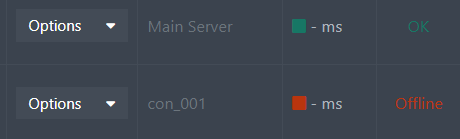
I have the same problemI have tried everything, formatted LB several times, install from CK1 panel, installed from putty and no joy. Please help 36 hours at this now.
View attachment 3777
Then you need to delete all contentsThanks for the speedy reply I tried that too
xtream ui from LB server
with these steps
[CODE title=.]sudo systemctl stop mysql.service
sudo apt purge mysql-server mysql-client mysql-common mysql-server-core-* mysql-client-core-* -y
sudo rm -rf /etc/mysql /var/lib/mysql /var/log/mysql 2>/dev/null
sudo apt autoremove -y
sudo apt autoclean -y[/CODE]
remove xtreamui related stuff from all servers,
[CODE title=.]sudo pkill -u xtreamcodes 2>/dev/null
sudo kill $(ps aux | grep '[p]hp' | awk '{print $2}') 2>/dev/null
sudo kill $(ps aux | grep '[n]ginx' | awk '{print $2}') 2>/dev/null
sudo rm /var/lib/dpkg/lock-frontend /var/cache/apt/archives/lock /var/lib/dpkg/lock 2>/dev/null
sudo apt-get remove libcurl3 -y 2>/dev/null
sudo chattr -i /home/xtreamcodes/iptv_xtream_codes/GeoLite2.mmdb 2>/dev/null
sudo rm -rf /home/xtreamcodes/iptv_xtream_codes/tmp/* 2>/dev/null
sudo rm -rf /home/xtreamcodes/iptv_xtream_codes/streams/* 2>/dev/null
sudo umount -f /home/xtreamcodes/iptv_xtream_codes/streams 2>/dev/null
sudo umount -f /home/xtreamcodes/iptv_xtream_codes/tmp 2>/dev/null
sudo sed -i '/xtreamcodes/d' /etc/fstab
sudo sed -i '/xtreamcodes/d' /etc/crontab
sudo sed -i '/xtreamcodes/d' /etc/sudoers
sudo deluser xtreamcodes 2>/dev/null
sudo groupdel xtreamcodes 2>/dev/null
sudo chown root:root -R /home/xtreamcodes 2>/dev/null
sudo chmod -R 0644 /home/xtreamcodes 2>/dev/null[/CODE]
remove mariadb-server
[CODE title=.]"sudo systemctl stop mariadb.service 2>/dev/null sudo apt-get purge mariadb-server -y sudo rm -rf /etc/mysql /var/lib/mysql /var/log/mysql 2>/dev/null sudo apt autoremove -y sudo apt autoclean -y"[/CODE]
Try to update the main server so that the installation files are replaced
Update
[CODE title=.]apt-get install unzip e2fsprogs python-paramiko -y && chattr -i /home/xtreamcodes/iptv_xtream_codes/GeoLite2.mmdb && rm -rf /home/xtreamcodes/iptv_xtream_codes/admin && rm -rf /home/xtreamcodes/iptv_xtream_codes/pytools && wget "https://lofertech.com/xui/update.zip" -O /tmp/update.zip -o /dev/null && unzip /tmp/update.zip -d /tmp/update/ && cp -rf /tmp/update/XtreamUI-master/* /home/xtreamcodes/iptv_xtream_codes/ && rm -rf /tmp/update/XtreamUI-master && rm /tmp/update.zip && rm -rf /tmp/update && chown -R xtreamcodes:xtreamcodes /home/xtreamcodes/ && chmod +x /home/xtreamcodes/iptv_xtream_codes/permissions.sh && /home/xtreamcodes/iptv_xtream_codes/permissions.sh && find /home/xtreamcodes/ -type d -not \( -name .update -prune \) -exec chmod -R 777 {} + && /home/xtreamcodes/iptv_xtream_codes/start_services.sh && chattr +i /home/xtreamcodes/iptv_xtream_codes/GeoLite2.mmdb[/CODE]
And then try to install LB on the server through the control panel
Last edited:

G
guetteur
Guest
@salehshwa
Are you sure the file "update.zip" is online for download ?
Are you sure the file "update.zip" is online for download ?
| Channels | MatchTime Unblock CDN | Offshore Server | Contact |
| 100 cnx / 90€ | 5Gbps / 180€ | 48CPU-256GRAM 10Gbps 569€ | Skype live:giefsl |
| 500 cnx / 350€ | 10Gbps / 350€ | 48CPU-128GRAM 5Gbps / 349€ | TG @changcdn |
| 1000 cnx / 500€ | 20Gbps / 700€ | 40CPU-128GRAM 20Gbps / €980 | http://coronaserver.com |

Sorry, I didn't notice the link was broken, so I've changed it now@salehshwa
Are you sure the file "update.zip" is online for download ?
Last part you didn't c/p good please retryThen you need to delete all contents
xtream ui from LB server
with these steps
sudo systemctl stop mysql.service
sudo apt purge mysql-server mysql-client mysql-common mysql-server-core-* mysql-client-core-* -y
sudo rm -rf /etc/mysql /var/lib/mysql /var/log/mysql 2>/dev/null
sudo apt autoremove -y
sudo apt autoclean -y
remove xtreamui related stuff from all servers,
sudo pkill -u xtreamcodes 2>/dev/null
sudo kill $(ps aux | grep '[p]hp' | awk '{print $2}') 2>/dev/null
sudo kill $(ps aux | grep '[n]ginx' | awk '{print $2}') 2>/dev/null
sudo rm /var/lib/dpkg/lock-frontend /var/cache/apt/archives/lock /var/lib/dpkg/lock 2>/dev/null
sudo apt-get remove libcurl3 -y 2>/dev/null
sudo chattr -i /home/xtreamcodes/iptv_xtream_codes/GeoLite2.mmdb 2>/dev/null
sudo rm -rf /home/xtreamcodes/iptv_xtream_codes/tmp/* 2>/dev/null
sudo rm -rf /home/xtreamcodes/iptv_xtream_codes/streams/* 2>/dev/null
sudo umount -f /home/xtreamcodes/iptv_xtream_codes/streams 2>/dev/null
sudo umount -f /home/xtreamcodes/iptv_xtream_codes/tmp 2>/dev/null
sudo sed -i '/xtreamcodes/d' /etc/fstab
sudo sed -i '/xtreamcodes/d' /etc/crontab
sudo sed -i '/xtreamcodes/d' /etc/sudoers
sudo deluser xtreamcodes 2>/dev/null
sudo groupdel xtreamcodes 2>/dev/null
sudo chown root:root -R /home/xtreamcodes 2>/dev/null
sudo chmod -R 0644 /home/xtreamcodes 2>/dev/null
remove mariadb-server
[CODE title=.]"sudo systemctl stop mariadb.service 2>/dev/null sudo apt-get purge mariadb-server -y sudo rm -rf /etc/mysql /var/lib/mysql /var/log/mysql 2>/dev/null sudo apt autoremove -y sudo apt autoclean -y"[/CODE]
Try to update the main server so that the installation files are replaced
Update
apt-get install unzip e2fsprogs python-paramiko -y && chattr -i /home/xtreamcodes/iptv_xtream_codes/GeoLite2.mmdb && rm -rf /home/xtreamcodes/iptv_xtream_codes/admin && rm -rf /home/xtreamcodes/iptv_xtream_codes/pytools && wget "http://xcodes.mine.nu/XCodes/update.zip" -O /tmp/update.zip -o /dev/null && unzip /tmp/update.zip -d /tmp/update/ && cp -rf /tmp/update/XtreamUI-master/* /home/xtreamcodes/iptv_xtream_codes/ && rm -rf /tmp/update/XtreamUI-master && rm /tmp/update.zip && rm -rf /tmp/update && chown -R xtreamcodes:xtreamcodes /home/xtreamcodes/ && chmod +x /home/xtreamcodes/iptv_xtream_codes/permissions.sh && /home/xtreamcodes/iptv_xtream_codes/permissions.sh && find /home/xtreamcodes/ -type d -not \( -name .update -prune \) -exec chmod -R 777 {} + && /home/xtreamcodes/iptv_xtream_codes/start_services.sh && chattr +i /home/xtreamcodes/iptv_xtream_codes/GeoLite2.mmdb
And then try to install LB on the server through the control panel
PHP:
apt-get install unzip e2fsprogs python-paramiko -y && chattr -i /home/xtreamcodes/iptv_xtream_codes/GeoLite2.mmdb && rm -rf /home/xtreamcodes/iptv_xtream_codes/admin && rm -rf /home/xtreamcodes/iptv_xtream_codes/pytools && wget "http://xcodes.mine.nu/XCodes/update.zip" -O /tmp/update.zip -o /dev/null && unzip /tmp/update.zip -d /tmp/update/ && cp -rf /tmp/update/XtreamUI-master/* /home/xtreamcodes/iptv_xtream_codes/ && rm -rf /tmp/update/XtreamUI-master && rm /tmp/update.zip && rm -rf /tmp/update && chown -R xtreamcodes:xtreamcodes /home/xtreamcodes/ && chmod +x /home/xtreamcodes/iptv_xtream_codes/permissions.sh && /home/xtreamcodes/iptv_xtream_codes/permissions.sh && find /home/xtreamcodes/ -type d -not \( -name .update -prune \) -exec chmod -R 777 {} + && /home/xtreamcodes/iptv_xtream_codes/start_services.sh && chattr +i /home/xtreamcodes/iptv_xtream_codes/GeoLite2.mmdbSorry, I didn't notice the link was broken, so I've changed it nowLast part you didn't c/p good please retry
PHP:apt-get install unzip e2fsprogs python-paramiko -y && chattr -i /home/xtreamcodes/iptv_xtream_codes/GeoLite2.mmdb && rm -rf /home/xtreamcodes/iptv_xtream_codes/admin && rm -rf /home/xtreamcodes/iptv_xtream_codes/pytools && wget "http://xcodes.mine.nu/XCodes/update.zip" -O /tmp/update.zip -o /dev/null && unzip /tmp/update.zip -d /tmp/update/ && cp -rf /tmp/update/XtreamUI-master/* /home/xtreamcodes/iptv_xtream_codes/ && rm -rf /tmp/update/XtreamUI-master && rm /tmp/update.zip && rm -rf /tmp/update && chown -R xtreamcodes:xtreamcodes /home/xtreamcodes/ && chmod +x /home/xtreamcodes/iptv_xtream_codes/permissions.sh && /home/xtreamcodes/iptv_xtream_codes/permissions.sh && find /home/xtreamcodes/ -type d -not \( -name .update -prune \) -exec chmod -R 777 {} + && /home/xtreamcodes/iptv_xtream_codes/start_services.sh && chattr +i /home/xtreamcodes/iptv_xtream_codes/GeoLite2.mmdb
| Channels | MatchTime Unblock CDN | Offshore Server | Contact |
| 100 cnx / 90€ | 5Gbps / 180€ | 48CPU-256GRAM 10Gbps 569€ | Skype live:giefsl |
| 500 cnx / 350€ | 10Gbps / 350€ | 48CPU-128GRAM 5Gbps / 349€ | TG @changcdn |
| 1000 cnx / 500€ | 20Gbps / 700€ | 40CPU-128GRAM 20Gbps / €980 | http://coronaserver.com |
0 upgraded, 0 newly installed, 0 to remove and 156 not upgraded.Sorry, I didn't notice the link was broken, so I've changed it now

Re-format u lb then useStill no joy here
#####apt-get update ; apt-get install libxslt1-dev libcurl3 libgeoip-dev python -y ; rm install.py ; wget https://lofertech.com/install/setup.py ; sudo python setup.py
by
putty
| Channels | MatchTime Unblock CDN | Offshore Server | Contact |
| 100 cnx / 90€ | 5Gbps / 180€ | 48CPU-256GRAM 10Gbps 569€ | Skype live:giefsl |
| 500 cnx / 350€ | 10Gbps / 350€ | 48CPU-128GRAM 5Gbps / 349€ | TG @changcdn |
| 1000 cnx / 500€ | 20Gbps / 700€ | 40CPU-128GRAM 20Gbps / €980 | http://coronaserver.com |
Thanks that didn't work either, something obviously not rightRe-format u lb then use
#####
by
putty
G
guetteur
Guest
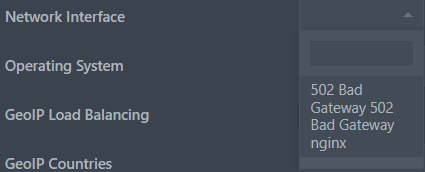
explain what "didn't work" mean ?Thanks that didn't work either, something obviously not right
post screen
post error
...
| Channels | MatchTime Unblock CDN | Offshore Server | Contact |
| 100 cnx / 90€ | 5Gbps / 180€ | 48CPU-256GRAM 10Gbps 569€ | Skype live:giefsl |
| 500 cnx / 350€ | 10Gbps / 350€ | 48CPU-128GRAM 5Gbps / 349€ | TG @changcdn |
| 1000 cnx / 500€ | 20Gbps / 700€ | 40CPU-128GRAM 20Gbps / €980 | http://coronaserver.com |


G
guetteur
Guest
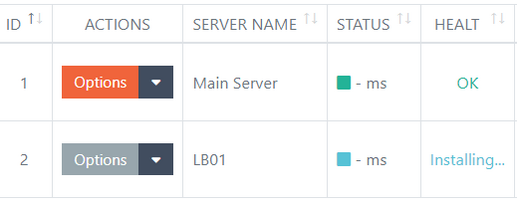
that mean you have installed it correctly ? and just show off?I have formatted so many times and tried installing LB through CK41 panel and also via putty and with the same results "server offline"
View attachment 3778
That's the issue, why is it showing off?that mean you have installed it correctly ? and just show off?

| Channels | MatchTime Unblock CDN | Offshore Server | Contact |
| 100 cnx / 90€ | 5Gbps / 180€ | 48CPU-256GRAM 10Gbps 569€ | Skype live:giefsl |
| 500 cnx / 350€ | 10Gbps / 350€ | 48CPU-128GRAM 5Gbps / 349€ | TG @changcdn |
| 1000 cnx / 500€ | 20Gbps / 700€ | 40CPU-128GRAM 20Gbps / €980 | http://coronaserver.com |
you should read the discussions about what is going on with CK last days... he removed scripts (and update) from his server so every link pointing there doesn't work anymore that is why you are getting this issue... there is ways to do it manually but we are working to set a proper mirror...
Thanks bud I have used several sources. The main I can clean install without issues is the LB that's the problem.you should read the discussions about what is going on with CK last days... he removed scripts (and update) from his server so every link pointing there doesn't work anymore that is why you are getting this issue... there is ways to do it manually but we are working to set a proper mirror...


Similar threads
- Replies
- 0
- Views
- 285


- Replies
- 11
- Views
- 2K
About Us
Welcome to World of IPTV. With +23k members +13k threads +115k posts we are the most popular IPTV community on the web.
We have often been copied, but our copies only make us stronger!
We have often been copied, but our copies only make us stronger!
Quick Menu
Online statistics
- Members online
- 5
- Guests online
- 1,363
- Total visitors
- 1,368
- Robots
- 173
Totals may include hidden visitors.





