
Welcome to World of IPTV

Join us now to get access to all our features. Once registered and logged in, you will be able to create topics, post replies to existing threads, give reputation to your fellow members, get your own private messenger, and so, so much more. It's also quick and totally free, so what are you waiting for?

Forum Rules

Our Rules: Read to avoid getting banned!

Advertising

Introduce Yourself to the World with Us!

Resource Database

Find the newest resources around IPTV!

Account upgrade

Upgrade your account to unlock more benefits!

Tutorial XUI.ONE Caching System

redhat

Administrator
Staff member
Administrator
Joined
Jun 19, 2019
Messages
3,472
Reaction score
17,123
Points
134
Location
root[@]woi
XUI.ONE Caching System


I’ve always found performance of other platforms to be lacking, knowing full well that the bottleneck is MySQL, it just takes a lot of CPU to open a new connection to MySQL and run queries. This CPU expense is unfortunately exacerbated by the fact that the typical streaming platform has thousands of concurrent connections therefore requiring thousands of new connections to MySQL.

The obvious way around this was to implement a caching system for static data, and a synchronisation system to ensure modified information is then reflected in the cache. This was implemented fairly early in the development of XUI, however has matured significantly since and is now exponentially faster than its initial iteration.
XUI Caching System is enabled by default in more recent versions, relying heavily on a multithreaded Cron that runs in the background. On system start-up, every line, stream, episode and various other pieces of information are extracted from MySQL and stored individually on a file system that utilises system memory for instant access without IO bottlenecks. Due to the memory bound nature, enabling cache on services with significant amounts of streams or lines results in high CPU usage which needs to be accounted for. However, the trade-off of the high memory usage is significantly improved performance across the board.

In terms of setup, very little is necessary. As Caching is enabled by default you can just leave it run as is, however if you see large CPU spikes during caching cron runs you can reduce the Thread Count to ensure less cores and threads are utilised during the generation process.
1655278708114.png

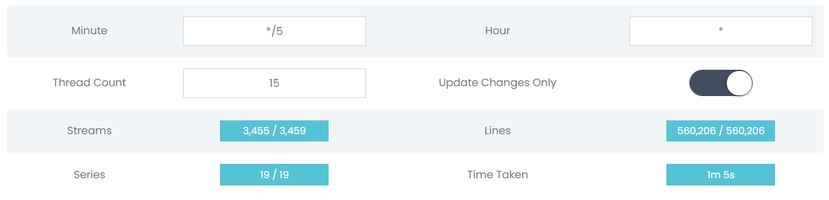
The above shows an example of the Caching system active on a test server. The system compares the amount of generated cache files against the total in the database to ensure the cache is complete and up to date. You’ll see that the Streams in cache is 4 less than in the database, this is due to purposefully broken stream entries in the database designed to ensure that the cache engine doesn’t cache anything that wouldn’t work.
The Minute and Hour variables are in a Cron format, as they are designed to directly amend the Crontab to change the frequency the caching script runs at. The above example runs every 5 minutes of every hour, if you would like a more advanced view of how Cron works you can read the Wikipedia Article relating to it.
The Thread Count variable decides how many threads are utilised when updating the cache, the higher the number, the faster the process, however CPU usage will go up accordingly.
Update Changes Only switch tells the cache system to use timestamps to detect when a Stream or Line has changed versus the currently cached content, selectively updating only the items that the system believes to have changed since the last cron run. Disabling this option will make the entire cache regenerate at each cron run for higher accuracy, you would probably need to adjust the Thread Count and cron timing if you were to go this route, however it is not recommended.

Should I use Caching?
Absolutely.
This is one of the defining factors that sets XUI apart from the competition, and if you compare performance between XUI and other platforms you will see a marked improvement due to Caching as well as other factors such as better, mindful programming with a focus on security as well as performance.

 
XUI.ONE Caching System


I’ve always found performance of other platforms to be lacking, knowing full well that the bottleneck is MySQL, it just takes a lot of CPU to open a new connection to MySQL and run queries. This CPU expense is unfortunately exacerbated by the fact that the typical streaming platform has thousands of concurrent connections therefore requiring thousands of new connections to MySQL.

The obvious way around this was to implement a caching system for static data, and a synchronisation system to ensure modified information is then reflected in the cache. This was implemented fairly early in the development of XUI, however has matured significantly since and is now exponentially faster than its initial iteration.
XUI Caching System is enabled by default in more recent versions, relying heavily on a multithreaded Cron that runs in the background. On system start-up, every line, stream, episode and various other pieces of information are extracted from MySQL and stored individually on a file system that utilises system memory for instant access without IO bottlenecks. Due to the memory bound nature, enabling cache on services with significant amounts of streams or lines results in high CPU usage which needs to be accounted for. However, the trade-off of the high memory usage is significantly improved performance across the board.

In terms of setup, very little is necessary. As Caching is enabled by default you can just leave it run as is, however if you see large CPU spikes during caching cron runs you can reduce the Thread Count to ensure less cores and threads are utilised during the generation process.

View attachment 3153

The above shows an example of the Caching system active on a test server. The system compares the amount of generated cache files against the total in the database to ensure the cache is complete and up to date. You’ll see that the Streams in cache is 4 less than in the database, this is due to purposefully broken stream entries in the database designed to ensure that the cache engine doesn’t cache anything that wouldn’t work.
The Minute and Hour variables are in a Cron format, as they are designed to directly amend the Crontab to change the frequency the caching script runs at. The above example runs every 5 minutes of every hour, if you would like a more advanced view of how Cron works you can read the Wikipedia Article relating to it.
The Thread Count variable decides how many threads are utilised when updating the cache, the higher the number, the faster the process, however CPU usage will go up accordingly.
Update Changes Only switch tells the cache system to use timestamps to detect when a Stream or Line has changed versus the currently cached content, selectively updating only the items that the system believes to have changed since the last cron run. Disabling this option will make the entire cache regenerate at each cron run for higher accuracy, you would probably need to adjust the Thread Count and cron timing if you were to go this route, however it is not recommended.

Should I use Caching?
Absolutely.
This is one of the defining factors that sets XUI apart from the competition, and if you compare performance between XUI and other platforms you will see a marked improvement due to Caching as well as other factors such as better, mindful programming with a focus on security as well as performance.

Quick question mate I currently recently change my main to like the next gen one but I'm seeing my CPU go higher now since changing it sits around 32-38 any advice how to reduce this please
 
Quick question mate I currently recently change my main to like the next gen one but I'm seeing my CPU go higher now since changing it sits around 32-38 any advice how to reduce this please
main cpu should always be under 10%. You surely have done something wrong or have streams on it
 
Channels MatchTime Unblock CDN Offshore Server Contact
100 cnx / 90€ 5Gbps / 180€ 48CPU-256GRAM 10Gbps 569€ Skype live:giefsl
500 cnx / 350€ 10Gbps / 350€ 48CPU-128GRAM 5Gbps / 349€ TG @changcdn
1000 cnx / 500€ 20Gbps / 700€ 40CPU-128GRAM 20Gbps / €980 http://coronaserver.com
main cpu should always be under 10%. You surely have done something wrong or have streams on it
I've checked mate it's blagging my head nothing is on it the old server was much slower aswell but it still never had a high cpu
 
I've checked mate it's blagging my head nothing is on it the old server was much slower aswell but it still never had a high cpu
check the server with top command to see which app using cpu then. It is simple
 
check the server with top command to see which app using cpu then. It is simple
Cheers pal I think it was having a moment I gave it a reboot and let connections go back on and it now sits around 4/5
 
Channels MatchTime Unblock CDN Offshore Server Contact
100 cnx / 90€ 5Gbps / 180€ 48CPU-256GRAM 10Gbps 569€ Skype live:giefsl
500 cnx / 350€ 10Gbps / 350€ 48CPU-128GRAM 5Gbps / 349€ TG @changcdn
1000 cnx / 500€ 20Gbps / 700€ 40CPU-128GRAM 20Gbps / €980 http://coronaserver.com
main cpu should always be under 10%. You surely have done something wrong or have streams on it
Hello don't use ubuntu 18.04 for main it's not recommanded , you will have high cpu or/and high memory usage
 
Redis Server have have got alot of vulnerabilitys last months, Code Injections that can provide open acess to panel
 
shape1
shape2
shape3
shape4
shape5
shape6
Back
Top







