

A new product by redhat is available: IpkoTV Auto Update Script for Xaccel (SU) v1.2 - The Python script grabs the required links & keys and automatically adds them to Xaccel-Panel via API
What does this DRM Script do?
The Python script grabs the required links & keys and automatically adds them to Xaccel-Panel via API.
It checks the validity at certain intervals and updates them fully automatically in Xaccel-Panel if they are no longer valid.
This ensures a failure of the streams.
How may channels can I get with the a script?
This varies greatly and depends on the restrictions of the provider.
Some providers have none at all and others have very strict restrictions.
How about in case of upates/changes by the provider?
You will get free updates for the first 6 months after ordering for minor changes by the provider.
Afterwards you can extend the updates for another 6 months with a 50% discount.
- Widevine CDM L3 or Playready Cert is allready included !
DRM Store
More Scripts:
 SELLING DRM PYTHON SCRIPTS FOR IPTV PROVIDERS
 Compatible with Xaccel-Codec Panel
✔ 100% Working | ✔ Daily Updated | ✔ Easy to use
 Each Script Only 250€
What does this DRM Script do?
The DRM Python script grabs the required stream URL's & keys and automatically adds them to Xaccel-Panel via API.
It checks the validity at certain intervals and updates them fully automatically in Xaccel-Panel if they are no longer valid.
This ensures a failure of the...
Documentation for Standablone Scripts:
Install Python3 and pip3
Open your terminal and enter the following command:
Install the Xaccel-Codec Panel:
Documentation for StreamUpdater Scripts:
Install Python3 and pip3
Open your terminal and enter the following command:
Install the Xaccel-Codec Panel:
Don't miss my other service offers:
Legal notice:
This offer is for training and research purposes. It is a prerequisite that you have a corresponding subscription with the provider. Viewing encrypted content without a subscription is illegal.
Read more about this product...
IpkoTV Auto Update Script for Xaccel (SU) v1.2
Description
Ipko TV
Auto-Update-Script for Xaccel
Auto-Update-Script for Xaccel
What does this DRM Script do?
The Python script grabs the required links & keys and automatically adds them to Xaccel-Panel via API.
It checks the validity at certain intervals and updates them fully automatically in Xaccel-Panel if they are no longer valid.
This ensures a failure of the streams.
How may channels can I get with the a script?
This varies greatly and depends on the restrictions of the provider.
Some providers have none at all and others have very strict restrictions.
How about in case of upates/changes by the provider?
You will get free updates for the first 6 months after ordering for minor changes by the provider.
Afterwards you can extend the updates for another 6 months with a 50% discount.
- Widevine CDM L3 or Playready Cert is allready included !
System Requirements
- Recommended OS: Ubuntu 22.04 or higher
- Recommended VPS/Server: Depending on the number/resolution/bitrate of the channels
- Third-party software: Xaccel-codec Panel - ( https://www.xaccel-codec.com )
- Account: You need a valid active subscription for the corresponding provider
(You will be able get those channels which are avalible in your subscription) - Python: 3.2 or higher and pip3
- Proxy Server: Non-blocked IP from the according to Provider Country
Info: To be sure that the streams really work with your proxy, you should log in to the provider's website using your proxy server, for example, via the Firefox browser, and test whether you can stream the all channels.
DRM Store
More Scripts:
 SELLING DRM PYTHON SCRIPTS FOR IPTV PROVIDERS Compatible with Xaccel-Codec Panel
 ✔ 100% Working | ✔ Daily Updated | ✔ Easy to use
Each Script Only 250€What does this DRM Script do?
The DRM Python script grabs the required stream URL's & keys and automatically adds them to Xaccel-Panel via API.
It checks the validity at certain intervals and updates them fully automatically in Xaccel-Panel if they are no longer valid.
This ensures a failure of the...
- redhat
- drm panel drm script
- Replies: 2
- Forum: DRM Auto Update Scripts

Documentation for Standablone Scripts:
Script Installation Tutorial for "Standalone" Scripts
Install Python3 and pip3
Open your terminal and enter the following command:
Bash:
sudo apt-get install python3 python3-pipInstall the Xaccel-Codec Panel:
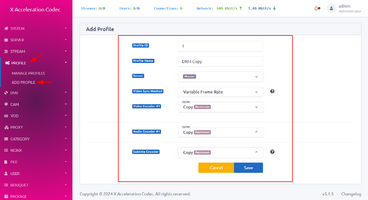
Create a profile in Xaccel-Codec according to the screenshot below:
Extract the script archive and upload the folder (in this example for MeoGo, adapt accordingly for other scripts)
- Extract the...
Documentation for StreamUpdater Scripts:
Script Installation Tutorial for "StreamUpdater" Scripts
Install Python3 and pip3
Open your terminal and enter the following command:
Bash:
sudo apt-get install python3 python3-pipInstall the Xaccel-Codec Panel:
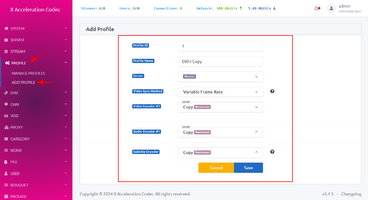
Create a profile in Xaccel-Codec according to the screenshot below:
The StreamUpdater Scripts always come with two archives (StreamUpdater + Provider).
Extract both script archives and upload the...
Don't miss my other service offers:
Legal notice:
This offer is for training and research purposes. It is a prerequisite that you have a corresponding subscription with the provider. Viewing encrypted content without a subscription is illegal.
Extended Product Information
Read more about this product...







